Why SMBs Should Be Looking at Microsoft Sentinel
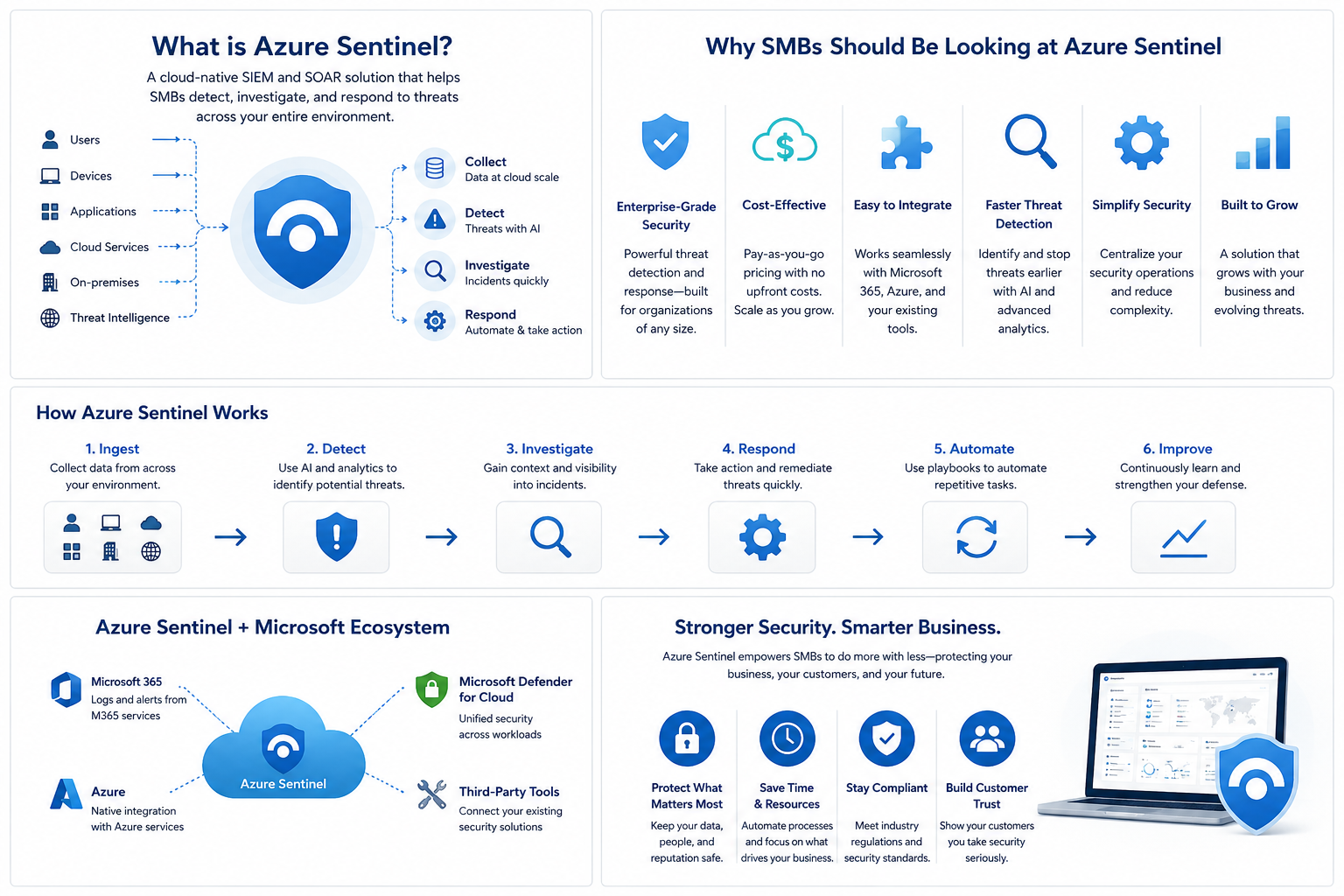
Microsoft Sentinel gives small and midsize businesses a practical way to centralize security visibility without turning security into a massive enterprise project.
Most small and midsize businesses already run on Microsoft.
Email is in Microsoft 365. Files are in SharePoint and OneDrive. Devices are managed with Intune. Identity lives in Entra ID. Security alerts come from Defender.
That means the security data already exists.
The problem is that it is usually spread across too many places.
One alert is in Defender. Another is buried in sign-in logs. Firewall activity is somewhere else. Email events live in another portal. By the time someone pieces it together, the real story may already be missed.
That is where Microsoft Sentinel starts to make sense.
Quick Take
| Question | Practical Answer |
|---|---|
| Is Sentinel only for large companies? | No. It can make sense for SMBs already using Microsoft 365, Defender, Intune, Entra ID, or Azure. |
| Does it replace Defender? | No. It works best alongside Defender. |
| What does paid ingestion cost? | For rough planning, I like using a conservative high-end estimate of about $5.25 per GB ingested. Actual pricing varies by Azure region, agreement, commitment tier, and retention settings. |
| Are Microsoft 365 logs always paid? | No. Several Microsoft 365 and Microsoft security data sources are free to ingest into Sentinel. |
| Best starting point? | Microsoft 365, Defender, Entra ID, and the highest-value firewall or VPN logs. |
What Sentinel Actually Does
Microsoft Sentinel is Microsoft’s cloud-native security monitoring platform.
In plain English, it collects security logs, alerts, and activity from different systems into one place so they can be searched, monitored, correlated, and investigated.
For SMBs, that can include Microsoft 365, Microsoft Defender, Entra ID sign-ins, Intune-managed devices, Azure resources, firewalls, VPNs, and selected on-premises systems.
Sentinel gives your business a better way to see what is happening across the environment instead of bouncing between disconnected portals.
Why This Matters for SMBs
Most SMBs do not need a massive security operations center.
They need a practical way to answer basic security questions:
| Security Question | Why It Matters |
|---|---|
| Who is trying to sign in? | Identity is one of the most common attack paths. |
| Are users creating suspicious mailbox rules? | Compromised mailboxes often hide or forward email. |
| Are files being deleted or downloaded in bulk? | This can point to compromise, ransomware, or accidental data loss. |
| Are Defender alerts tied to suspicious sign-ins? | Endpoint alerts are more useful with identity context. |
| Are VPN or firewall logins happening after hours? | Remote access activity should not be invisible. |
| Are admin accounts making risky changes? | Privileged activity needs visibility. |
That is the real value of Sentinel. It helps connect the dots between identity, email, endpoint, cloud, and network activity.
For example, a user signs in from an unusual location, creates a suspicious inbox rule, and then Defender flags unusual activity on that same user's device. Those events may live in different places, but Sentinel can help bring them together so IT can investigate one connected story instead of chasing separate alerts across multiple portals.
The Cost Is More Manageable Than People Think
One of the biggest concerns with Microsoft Sentinel is cost.
That is fair. Sentinel is consumption-based, which means pricing depends on how much data you ingest, how long you retain it, and which data sources you connect.
For planning, I like using a conservative high-end estimate of around $5.25 per GB ingested. The actual cost may be lower depending on the Azure region, agreement, commitment tier, retention settings, and the type of data being collected.
The reason for using a higher planning number is simple: it is better to slightly overestimate than to sell the project too cheaply and surprise everyone later.
The other important point is that not all Microsoft security data is paid ingestion. Microsoft includes several free Sentinel data sources, including Azure Activity Logs, Microsoft Sentinel Health, Office 365 Audit Logs, and security alerts from Microsoft Defender products.
For SMBs already using Microsoft 365, this matters. A lot of the first security value comes from monitoring Microsoft 365, Entra ID, Defender, and endpoint activity before pulling in every firewall, server, and application log.
That is how Sentinel becomes practical for smaller organizations: start with the highest-value data, keep retention reasonable, and expand only when there is a clear reason.
Rough Monthly Cost Examples
These examples use a conservative high-end estimate of $5.25 per GB and 30 days per month.
| Paid Ingestion | Estimated Monthly Cost |
|---|---|
| 0.5 GB/day | ~$80/month |
| 1 GB/day | ~$160/month |
| 2 GB/day | ~$315/month |
| 5 GB/day | ~$790/month |
| 10 GB/day | ~$1,575/month |
This does not mean every SMB will land in one of these exact ranges.
A cloud-only company may generate less paid ingestion than expected because some Microsoft 365 data is free. A company with noisy firewall logs, many servers, or heavy VPN activity may generate more.
The key is to start with the data sources that matter most instead of sending everything into Sentinel on day one.
Before production rollout, pricing should still be validated in the Azure pricing calculator using the customer's actual Azure region, licensing, retention needs, and expected data sources.
How Sentinel Compares to Other Options
Sentinel is not the only way to monitor security activity.
For many SMBs, the real question is not whether Sentinel is the best security platform. The better question is whether it gives the business the right balance of visibility, control, cost, and complexity.
| Option | Best Fit | Strengths | Trade-Offs |
|---|---|---|---|
| Defender portals only | Smaller Microsoft-focused environments that want basic alert review | Already included with many Microsoft licensing plans, easy to start, strong Microsoft security visibility | Data is spread across multiple portals, harder to correlate events, limited long-term log analysis |
| Microsoft Sentinel | SMBs that want centralized visibility across Microsoft 365, identity, endpoints, Azure, and selected network logs | Centralizes alerts and logs, strong Microsoft integration, flexible alerting, searchable history, useful dashboards and workbooks | Requires Azure setup, tuning, ownership, and some technical skill |
| Managed MDR service | Businesses that want someone else watching alerts and escalating issues | Outsourced monitoring, less internal effort, useful when no one has time to review alerts | Less direct control, recurring service cost, data may live in a third-party platform, quality varies by provider |
| Other SIEM platforms | Organizations with mixed environments or less Microsoft-heavy infrastructure | Can be strong for non-Microsoft ecosystems, broad third-party integrations, mature enterprise features | Often higher cost, more complexity, more effort to deploy and tune for SMB use cases |
For Microsoft-heavy SMBs, Sentinel is compelling because it can sit close to the systems they already use every day.
That does not mean every business should manage Sentinel alone. Some may choose to build the logging and alerting foundation in their own Microsoft tenant, then have an internal IT team, consultant, MSP, or MSSP help monitor and respond to alerts.
That model gives the business more control over its own security data while still allowing outside help when needed.
Who Should Own Sentinel?
This is one of the most important parts to get right.
Sentinel should have a clear owner.
Turning it on is not the hard part. The harder part is making sure someone is responsible for reviewing alerts, tuning detections, maintaining data sources, and responding when something needs attention.
For SMBs, ownership usually falls into one of three models:
| Ownership Model | How It Usually Works |
|---|---|
| Internal IT | An internal IT lead or small team reviews alerts, tunes detections, and handles investigation |
| MSP or MSSP | An outside provider helps monitor alerts, tune the environment, and escalate important issues |
| Hybrid | Internal IT owns the platform while a partner helps with setup, tuning, or higher-level monitoring |
The hybrid model can work especially well for SMBs.
The business keeps the security data in its own Microsoft tenant. Internal IT gets better visibility and control. A trusted partner can still help with setup, alert tuning, workbook creation, incident review, or after-hours escalation.
The point is simple: Sentinel should not be treated as a checkbox. It needs ownership, even if that ownership is shared.
What I Would Monitor First
A good first phase should focus on alerts that are easy to understand and worth acting on.
| Area | Example Monitoring |
|---|---|
| Identity | Risky sign-ins, failed logins, admin account activity |
| Suspicious mailbox rules, phishing-related alerts | |
| Endpoint | Defender incidents, malware detections, risky devices |
| Data | Mass file deletion, unusual file access, external sharing |
| Firewall / VPN | Failed VPN logins, admin login attempts, after-hours access |
| Admin Changes | Role changes, policy changes, privileged access activity |
You do not need hundreds of alerts.
You need the right alerts going to the right people.
For most SMBs, the best rollout is phased. Start with Microsoft 365, Entra ID, and Defender. Then add firewall or VPN logs if they matter. After that, expand only into key servers or infrastructure where there is a clear security, operational, or compliance reason.
When Sentinel Makes Sense
Sentinel is worth considering if your business:
- Uses Microsoft 365 heavily
- Already has Microsoft Defender alerts
- Wants better visibility into identity and admin activity
- Has multiple locations or VPN users
- Has firewalls, servers, or network devices worth monitoring
- Needs better auditability
- Has compliance or cyber insurance pressure
- Wants a practical security monitoring foundation
It is especially useful for businesses already using Microsoft 365 Business Premium, Microsoft Defender, Azure, or Intune-managed devices.
Most SMBs do not need a massive enterprise SIEM project, but they do need better security visibility. Sentinel can fill that gap when it is scoped and managed correctly.
A Note for Healthcare and Financial Services
For healthcare, financial services, and other regulated businesses, security monitoring is not just a nice-to-have.
These organizations are often expected to show that they can detect suspicious activity, review access, investigate incidents, retain useful logs, and prove that security events are being monitored in a reasonable way.
Sentinel does not automatically make a business compliant.
But it can help support compliance and audit readiness by centralizing security logs, preserving investigation history, and giving IT teams a clearer way to show what happened, when it happened, and how it was handled.
For regulated SMBs, the goal is not to collect every possible log. The goal is to collect the right logs, keep them long enough to be useful, and have a process for reviewing and responding to important alerts.
The Bottom Line
Microsoft Sentinel is not just for large enterprises anymore.
For small and midsize businesses already using Microsoft 365, it can be a practical way to centralize alerts, improve security visibility, and make better use of the data that already exists.
The best approach is to keep it focused.
Start with Microsoft 365, Defender, Entra ID, and the highest-value firewall or VPN logs. Watch the ingestion costs. Tune the alerts. Then expand only where it makes sense.
Used correctly, Sentinel can help SMBs move from reactive security to practical monitoring without turning it into a massive enterprise security project.
If you are not sure where Sentinel fits, start with a simple review: what Microsoft 365 logs you already have, what security alerts are currently being reviewed, what firewall or VPN logs matter, and who would respond when something important happens.
That gives you a realistic starting point before spending money or overbuilding the solution.